Unlock the full potential of your workshop with our complete guide to desktop CNC. Discover best practices, key features, and solutions from trusted desktop CNC experts. Find the perfect, reliable machine for your custom manufacturing needs.
Introduction to Desktop CNC
Hey there! If you’re working in manufacturing or have a DIY project in mind, you might have heard of desktop CNC machines. These machines are compact, precise, and perfect for those who want to take their crafting or prototyping to the next level. Whether you’re making small metal parts or intricate wooden designs, desktop CNC machines can give you the power of a large CNC machine right at your desk.
But why are desktop CNC machines so important? Well, they allow you to create high-precision parts without needing a massive workshop. Think of it like having a full-sized workshop packed into a small, affordable machine. This is especially useful for small businesses, hobbyists, and makers who need versatility and reliability in a smaller, more budget-friendly package.
Desktop CNC Company
Desktop CNC Best Practices
When it comes to using desktop CNC machines, following best practices is key. These best practices ensure your machine works efficiently and that your projects turn out great every time. First, start with the basics—always keep your machine clean and properly lubricated. Just like a car needs regular oil changes, your CNC machine needs care to run smoothly.
Another best practice is to use the right materials. Desktop CNC machines are designed to work with a variety of materials, including wood, plastics, and soft metals. However, using the correct cutting tools and settings for each material is important to avoid damage to both your machine and the material you’re working with. For example, cutting aluminum requires different speeds and tools than cutting plastic.
Desktop CNC Process
The process of using a desktop CNC machine is straightforward once you get the hang of it. First, you need to design your project on a computer using CAD (Computer-Aided Design) software. Then, you’ll convert that design into a program that the CNC machine can understand using CAM (Computer-Aided Manufacturing) software. Finally, load your material, set the machine’s parameters, and let the CNC do its magic.
The beauty of CNC technology is that it’s automated. Once set up, the machine follows the design and specifications to mill, cut, or engrave the material to the exact shape required. Whether you’re creating a custom part for a robot or a decorative plaque, this process ensures precision and consistency.
Custom Desktop CNC
Desktop CNC Performance
Performance is everything when it comes to CNC machines, and desktop CNCs are no exception. These machines may be small, but they pack a punch in terms of precision and speed. The key is the spindle speed and the ability to adjust settings for various materials. Faster spindle speeds are great for soft materials like wood, while slower speeds are better for harder materials like metal.
When comparing performance across different desktop CNC models, consider how much precision you need for your projects. For example, in the jewelry industry, every detail matters. So, you’ll want a machine that can handle very fine cuts and intricate designs with precision.
Desktop CNC Technical Specifications
The technical specifications of a desktop CNC machine can tell you a lot about what it can do. Key specs to look out for include the machine’s cutting area (the maximum size of the material it can handle), spindle power (how strong the motor is), and the number of axes the machine uses. Most desktop CNCs are 3-axis machines, which means they can move along the X, Y, and Z axes to cut material from all angles.
Additionally, consider the machine’s resolution and repeatability. These are indicators of how precise the cuts will be and how consistent the machine can be over multiple runs. If you’re making parts that need to fit together precisely, you’ll want a machine with high repeatability.
Trusted Desktop CNC
Desktop CNC Standards
Desktop CNC machines come with industry standards that ensure the machine performs safely and efficiently. These standards often include electrical certifications, safety protocols, and operational limits to keep users safe while ensuring high performance. It’s essential to purchase a machine from a trusted manufacturer who adheres to these standards.
For example, some machines may come with UL (Underwriters Laboratories) certification, ensuring they meet rigorous safety standards. Always check for such certifications when choosing a CNC machine to ensure you’re investing in a reliable, high-quality product.
Reliable Desktop CNC
A reliable desktop CNC machine is one that can withstand constant use and continue to deliver accurate results. One of the key factors in reliability is the build quality of the machine. A solid, durable frame will help keep the machine stable during operation, ensuring smooth cuts and high-quality results. Also, a machine with easy-to-access service and maintenance support is crucial for long-term reliability.
Desktop CNC Expert
Becoming a desktop CNC expert requires both knowledge and hands-on experience. Understanding how to properly set up your machine, how to maintain it, and how to tweak your designs and settings is key. Many operators start by learning the basics through online resources or through training offered by CNC machine manufacturers.
One of the most important aspects of becoming an expert is learning to troubleshoot issues. For example, if you’re having trouble with surface finish, you’ll need to adjust things like cutting speeds, feeds, and tool types. Over time, you’ll get better at diagnosing problems and coming up with effective solutions, improving your CNC skills.
Best Practices & Implementation Suggestions
Success Case Analysis
One company I know used desktop CNC machines to ramp up their prototyping process. They went from designing by hand and outsourcing the parts to making everything in-house, saving both time and money. By sticking to a structured routine for maintenance and updates, they were able to keep their machines running smoothly and increase output by 30% within the first year.
Common Problems and Solutions
Problem: Material shifting during cutting.
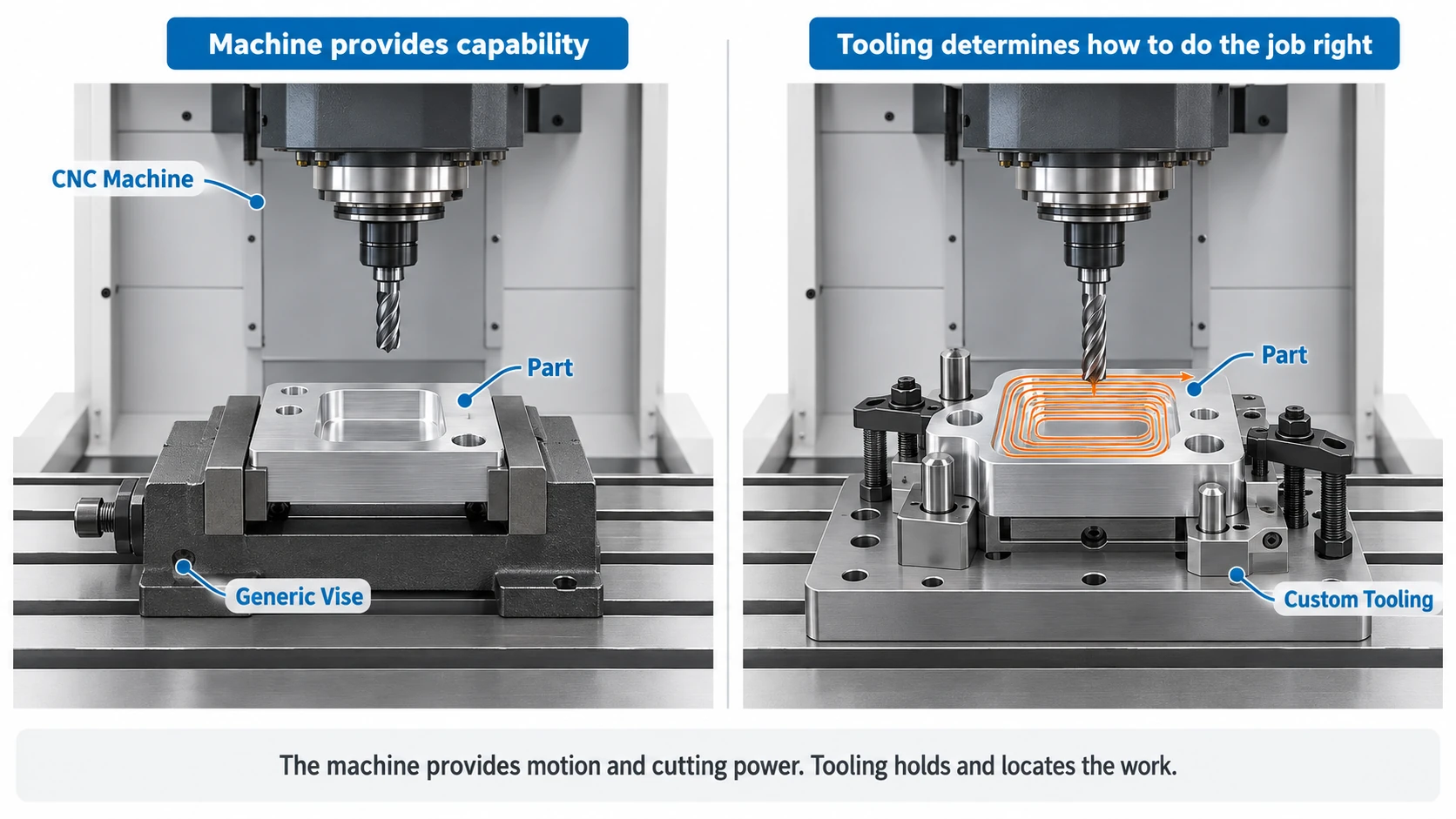
Solution: Use proper clamping and fixturing methods to secure materials tightly to prevent shifting during cutting.
Problem: Poor surface finish.
Solution: Check your tool condition, feed rates, and cutting speed to ensure a smooth finish. Make sure the material is secured properly and the machine is calibrated correctly.
Step-by-Step Implementation Guide
- Step 1: Define the project requirements and materials you’ll work with.
- Step 2: Select the appropriate desktop CNC machine based on size, precision, and material compatibility.
- Step 3: Set up your machine, load the material, and test basic cuts to ensure calibration.
- Step 4: Start with simple projects and gradually progress to more complex designs.
- Step 5: Maintain the machine regularly to ensure longevity and reliable performance.
Conclusion and Future Outlook
Summary of Key Points
Desktop CNC machines offer an affordable, reliable solution for small-scale precision manufacturing. Whether you’re a hobbyist or running a small business, these machines can give you the tools to create high-quality parts with ease.
Trends in the Manufacturing Industry
The future of desktop CNC machines is exciting. As technology advances, these machines are becoming more user-friendly, faster, and capable of handling more complex materials. Integration with smart software and automation is also on the rise, making these machines even more efficient and capable.
Recommendations for Next Steps
If you’re thinking about investing in a desktop CNC machine, take your time to assess your needs. Research different models, ask for demonstrations, and get feedback from other users. Once you choose the right machine, implement a solid training and maintenance routine to ensure your success in the long run.