CNC chatter is an unstable vibration that occurs between the cutting tool and workpiece during machining. It can create visible wave-like marks, poor surface finish, dimensional variation, excessive noise, and faster tool wear.
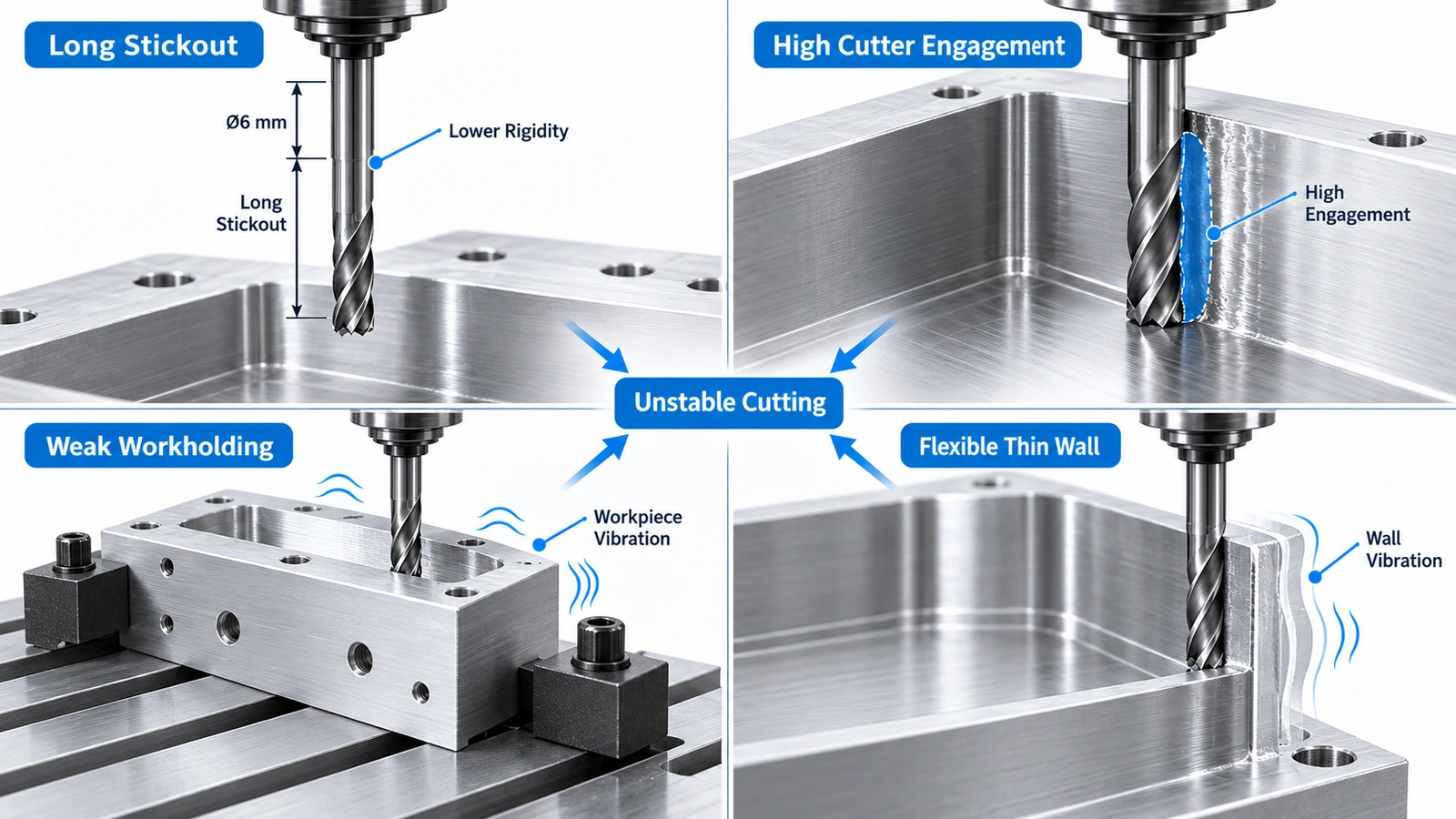
Chatter is common in milling operations involving long tool stickout, deep pockets, thin walls, weak workholding, or unstable cutting parameters.
Reducing chatter usually requires improving rigidity, changing cutting engagement, adjusting spindle speed, or modifying the toolpath rather than simply slowing the machine down.
What Is CNC Chatter?
Chatter is a self-excited vibration that develops during cutting.
As the tool removes material, cutting forces cause small movements in the tool, workpiece, holder, spindle, or machine structure. Under unstable conditions, these movements affect the next cutting pass and can reinforce the vibration.
The result is a repeating vibration pattern rather than a smooth, stable cut.
This can produce:
- Rippled surface marks.
- High cutting noise.
- Irregular tool engagement.
- Reduced dimensional accuracy.
- Faster tool wear.
Chatter is different from normal machine vibration.
A CNC machine always produces some vibration during cutting. Chatter becomes a problem when the vibration grows enough to affect surface quality, accuracy, or process stability.
What Do Chatter Marks Look Like?
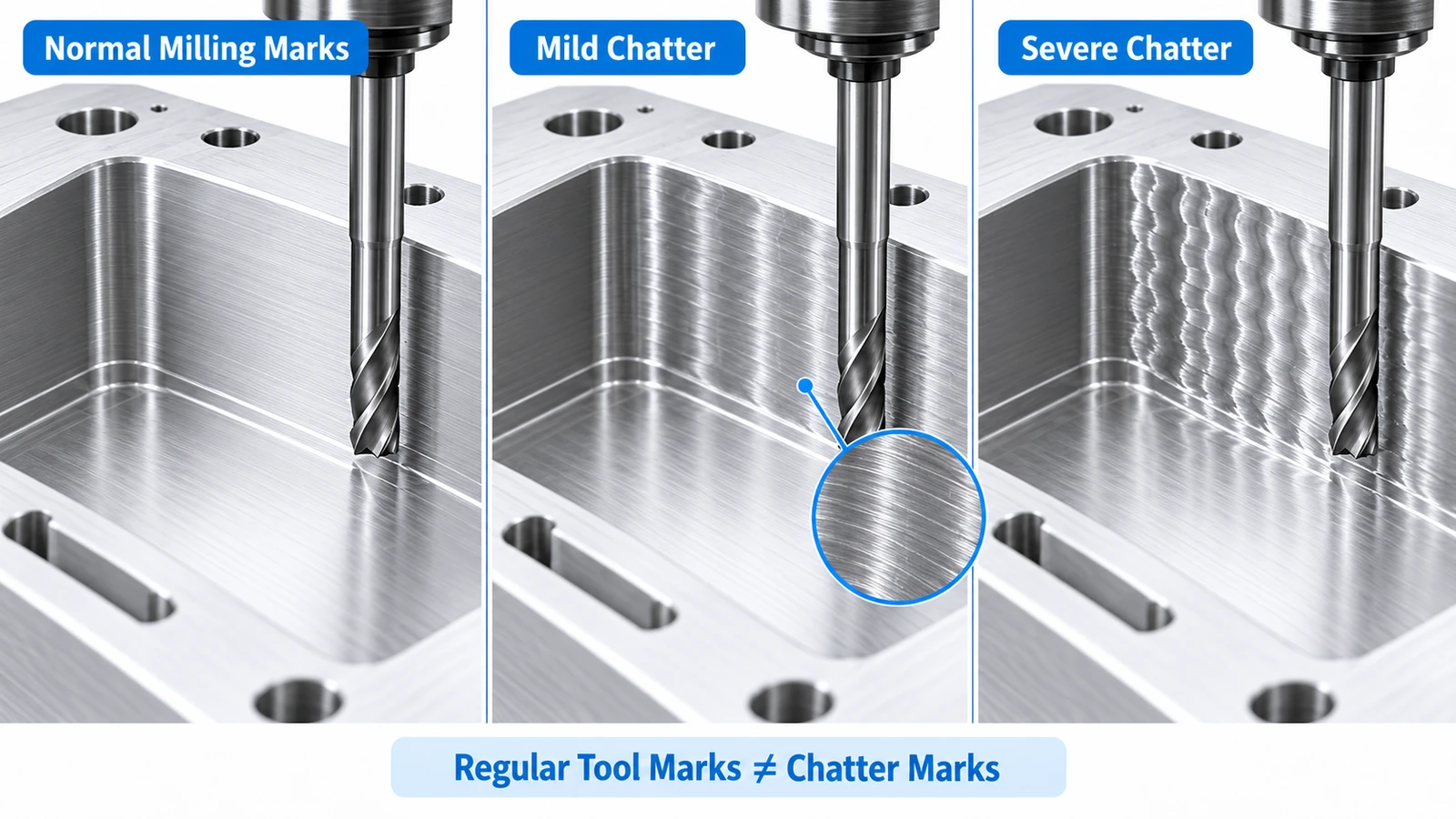
Chatter marks usually appear as repeated waves, ripples, or closely spaced patterns on the machined surface.
On a vertical milled wall, they may look like:
- Repeating diagonal lines.
- Wavy horizontal patterns.
- Uneven scallops.
- Periodic bright and dark bands.
These marks are different from normal tool marks.
Normal milling marks are usually regular and consistent with the toolpath.
Chatter marks often look more irregular or strongly periodic because the tool is vibrating while cutting.
Xometry notes that chatter can create irregular surface patterns and is commonly associated with machining instability.
What Causes Chatter in CNC Milling?
CNC chatter usually comes from a lack of rigidity, unstable cutting engagement, or resonance in the machining system.
Long Tool Stickout
Longer tool overhang reduces stiffness.
When a long end mill is exposed far from the holder, cutting forces can cause greater movement at the tool tip.
This is especially common when machining:
- Deep pockets.
- Tall walls.
- Deep slots.
- Hard-to-reach internal features.
Long stickout also increases the risk of tool deflection, which can further reduce cutting stability.
Excessive Cutting Engagement
Large radial or axial engagement increases cutting force.
If the cutter repeatedly enters heavy engagement, especially in corners, the force may become unstable.
This can trigger chatter even when the machine and holder are otherwise rigid.
Incorrect Spindle Speed
Chatter often depends on the relationship between:
- Spindle speed.
- Number of cutting edges.
- Tool natural frequency.
- Workpiece stiffness.
- Machine dynamics.
This means chatter may appear strongly at one spindle speed but become much smaller after changing RPM.
Simply reducing speed does not always solve the problem.
Sometimes increasing or decreasing spindle speed moves the cutting process away from an unstable resonance condition.
Weak Workholding
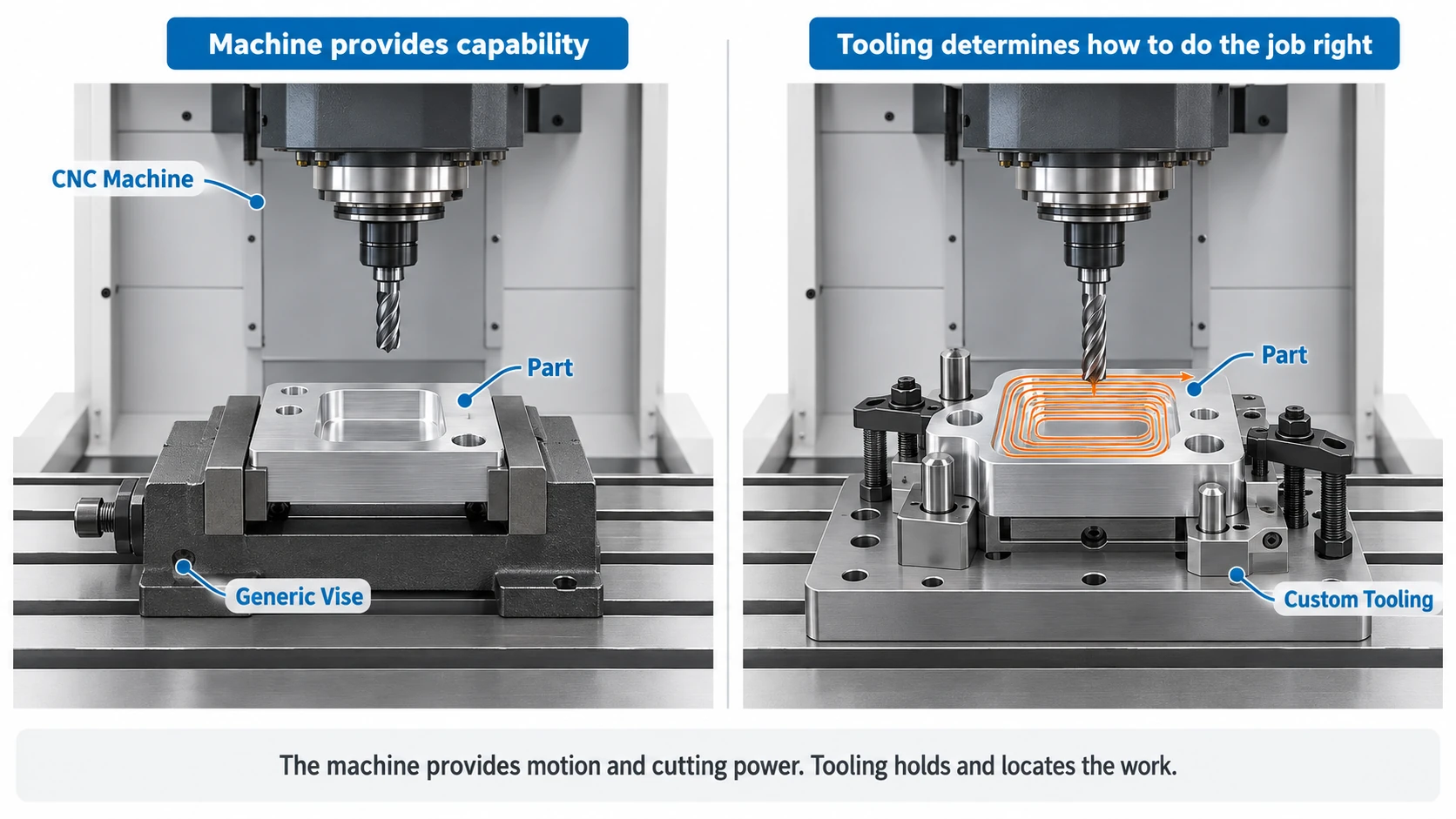
A rigid cutter cannot produce stable machining if the workpiece moves.
Poor fixturing can allow the part to:
- Vibrate.
- Flex.
- Lift.
- Rotate slightly.
Thin or large workpieces are especially sensitive to inadequate support.
Xometry recommends securing both the tool and workpiece properly to reduce vibration and improve surface finish.
Thin Walls and Flexible Features
- Thin aluminum walls can vibrate during finishing.
- The wall may move away from the cutter and then spring back repeatedly.
- This can produce chatter even when the cutting tool itself is relatively rigid.
- Thin-wall vibration can also make dimensional control difficult.
Worn or Unsuitable Cutting Tools
- A worn tool requires greater cutting force.
- This can increase vibration and worsen chatter.
- Tool geometry also matters. Cutter diameter, flute count, helix angle, and tool material all influence how cutting forces enter the system.
Tool Chatter vs Workpiece Vibration
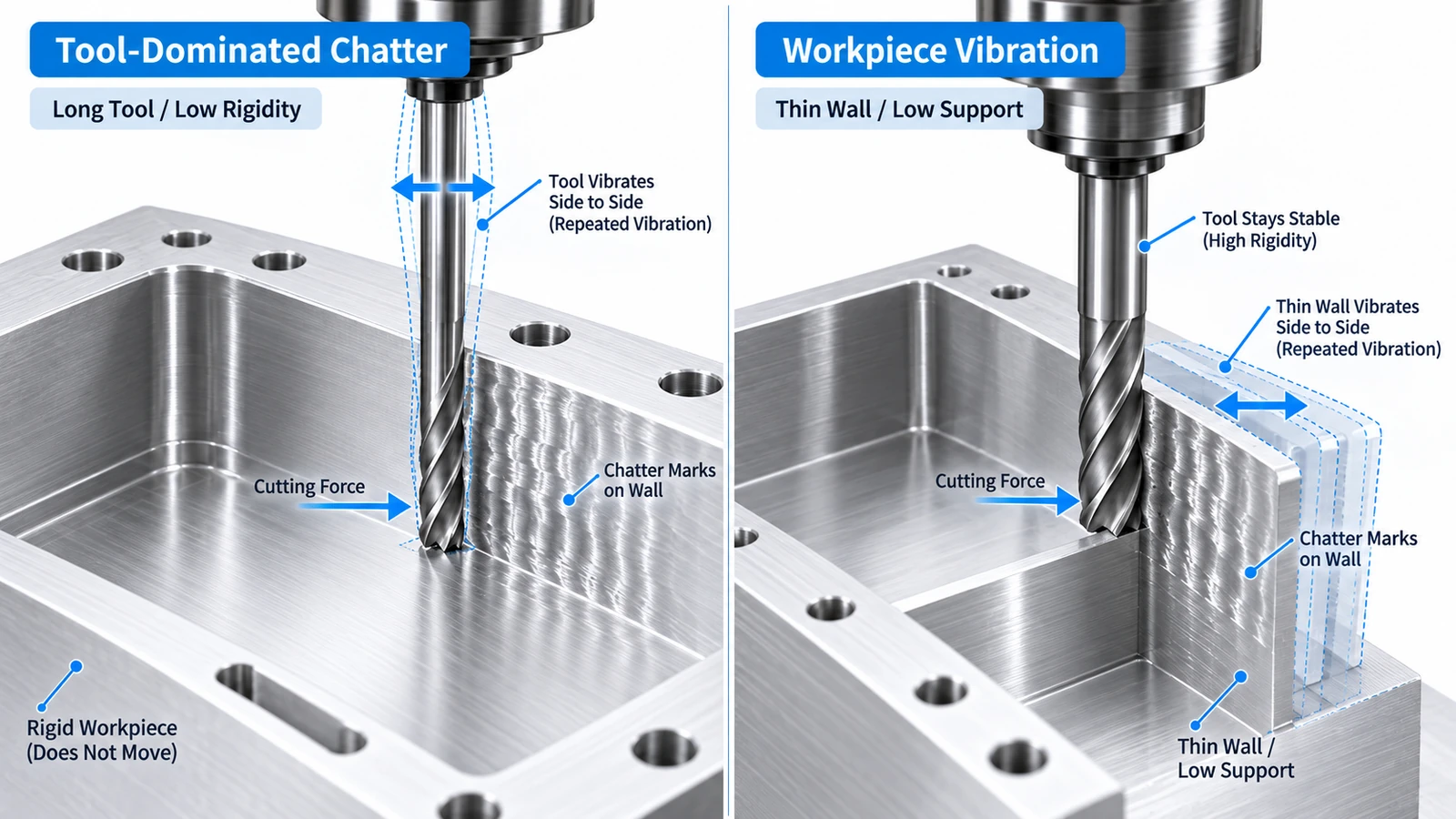
Not all chatter has the same source.
Tool-Dominated Chatter
The cutting tool is the most flexible part of the system.
This is common with:
- Small-diameter cutters.
- Long stickout.
- Deep pockets.
- Long-reach finishing tools.
The solution usually focuses on reducing tool overhang, changing cutter geometry, or reducing cutting forces.
Workpiece-Dominated Chatter
The workpiece itself vibrates.
This often happens with:
- Thin walls.
- Thin plates.
- Tall ribs.
- Poorly supported components.
In this case, changing the tool alone may not solve the problem.
Additional support, different machining sequence, or lighter finishing cuts may be required.
For difficult parts, both tool and workpiece vibration can occur at the same time.
How to Reduce CNC Chatter
The best solution depends on where the vibration originates.
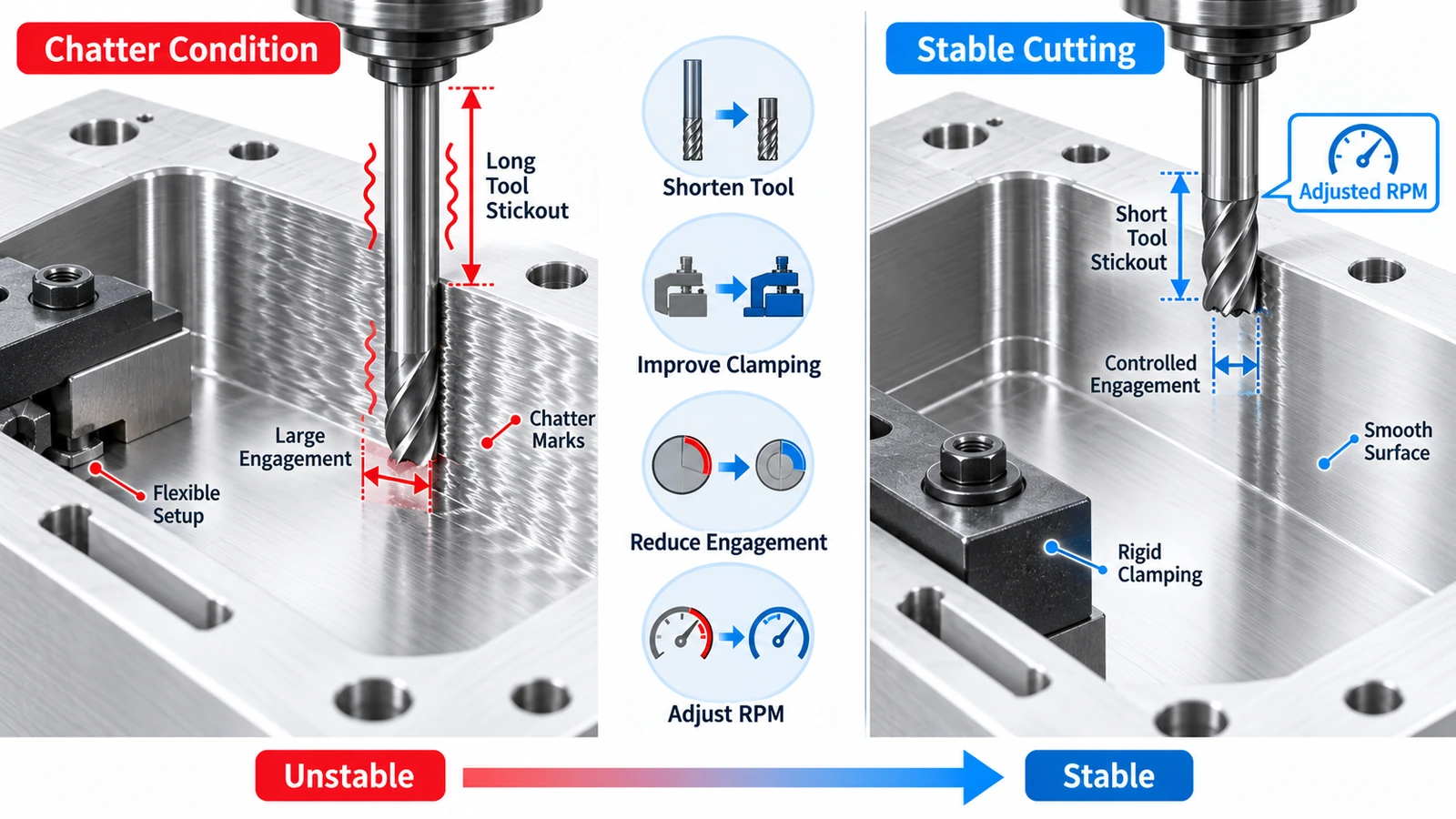
1. Reduce Tool Stickout
Use the shortest practical tool and holder setup.
Reducing unnecessary overhang increases rigidity and often improves stability immediately.
This is particularly important for deep-pocket milling.
2. Improve Workholding
Clamp the workpiece securely and support flexible areas.
Where possible:
- Reduce unsupported distance.
- Add support beneath thin sections.
- Clamp closer to the cutting area.
- Use additional fixtures for large parts.
3. Adjust Spindle Speed
Changing RPM can move the cutting process away from an unstable vibration range.
If chatter appears at one speed, test a meaningful spindle-speed change rather than making very small adjustments.
The correct direction depends on the tool, machine, material, and cutting conditions.
4. Reduce Radial Engagement
Reducing radial depth of cut lowers lateral cutting force.
This is particularly useful for:
- Long tools.
- Deep walls.
- Finishing passes.
Xometry similarly recommends lowering radial engagement to help reduce excessive vibration in side milling.
5. Maintain Consistent Cutter Engagement
Sudden increases in cutter engagement can trigger chatter.
Internal corners are a common example because the tool engagement can increase sharply as the cutter changes direction.
Smooth toolpaths and larger internal corner radii can reduce these sudden load changes.
Xometry notes that undersized internal corner radii can force a cutter into a sharp directional change, increasing vibration and chatter marks.
6. Use a More Rigid Tool Setup
If geometry permits:
- Use a larger cutter diameter.
- Use a shorter tool.
- Minimize holder extensions.
- Use a rigid toolholder.
- Check collet and holder condition.
A more rigid tool system reduces movement under cutting force.
7. Use Light Finishing Passes
For precision surfaces, leave controlled finishing stock after roughing.
Then use a light final pass with stable engagement.
This usually produces a better result than trying to achieve final dimensions during aggressive roughing.
CNC Chatter Example: Deep Aluminum Pocket
Consider a 6061 aluminum housing with:
- 45 mm deep pocket.
- Ø6 mm end mill.
- Long tool stickout.
- Tall internal wall.
During finishing, the lower section of the pocket develops visible repeating marks and a high-pitched cutting sound.
The first reaction may be to reduce feed dramatically.
However, that does not necessarily address the actual cause.
A more effective troubleshooting sequence would be:
- Shorten tool stickout if possible.
- Check holder and workpiece rigidity.
- Reduce radial finishing engagement.
- Adjust spindle speed.
- Leave uniform finishing stock.
- Use a light final finishing pass.
If the chatter disappears after reducing stickout, tool-system flexibility was likely an important factor.
If the problem remains concentrated on a thin wall, workpiece vibration may be the main cause.
CNC Chatter vs Tool Deflection
Chatter and tool deflection are related, but they are not the same.
Tool deflection is the elastic bending of the cutter under cutting force.
Chatter is unstable vibration in the machining system.
A tool can deflect without producing visible chatter.
However, excessive flexibility can make the system more susceptible to chatter.
For a detailed explanation of tool bending, see our guide to CNC tool deflection.
Conclusion
CNC chatter is an unstable vibration that can reduce surface quality, dimensional accuracy, and tool life.
The most common causes are:
long tool stickout + insufficient rigidity + unstable engagement + unsuitable spindle speed
The most effective solutions are usually to shorten the tool setup, improve workholding, control cutter engagement, and adjust spindle speed.
For deep pockets, tall walls, and thin features, chatter should be considered together with tool and workpiece deflection rather than treated only as a surface-finish problem.