5-axis CAM simulation helps prevent machining collisions by checking tool movements, holder clearance, fixture positions, and machine-axis motion before cutting begins. It allows programmers to identify interference risks, adjust tool orientation, and verify whether a toolpath can safely reach complex features.
However, CAM simulation does not automatically guarantee a collision-free process. Reliable verification requires accurate digital models, correct machine kinematics, and validation of the actual NC program.
Why Are Collisions More Common in 5-Axis Machining?
In 3-axis CNC machining, the cutting tool generally maintains a fixed orientation while moving along the X, Y, and Z axes. This makes many tool clearance problems relatively straightforward to evaluate.
5-axis machining introduces additional rotary motion. The cutting tool or workpiece can change orientation during machining, allowing access to angled surfaces, undercuts, and complex contours.
This flexibility also creates additional collision risks.
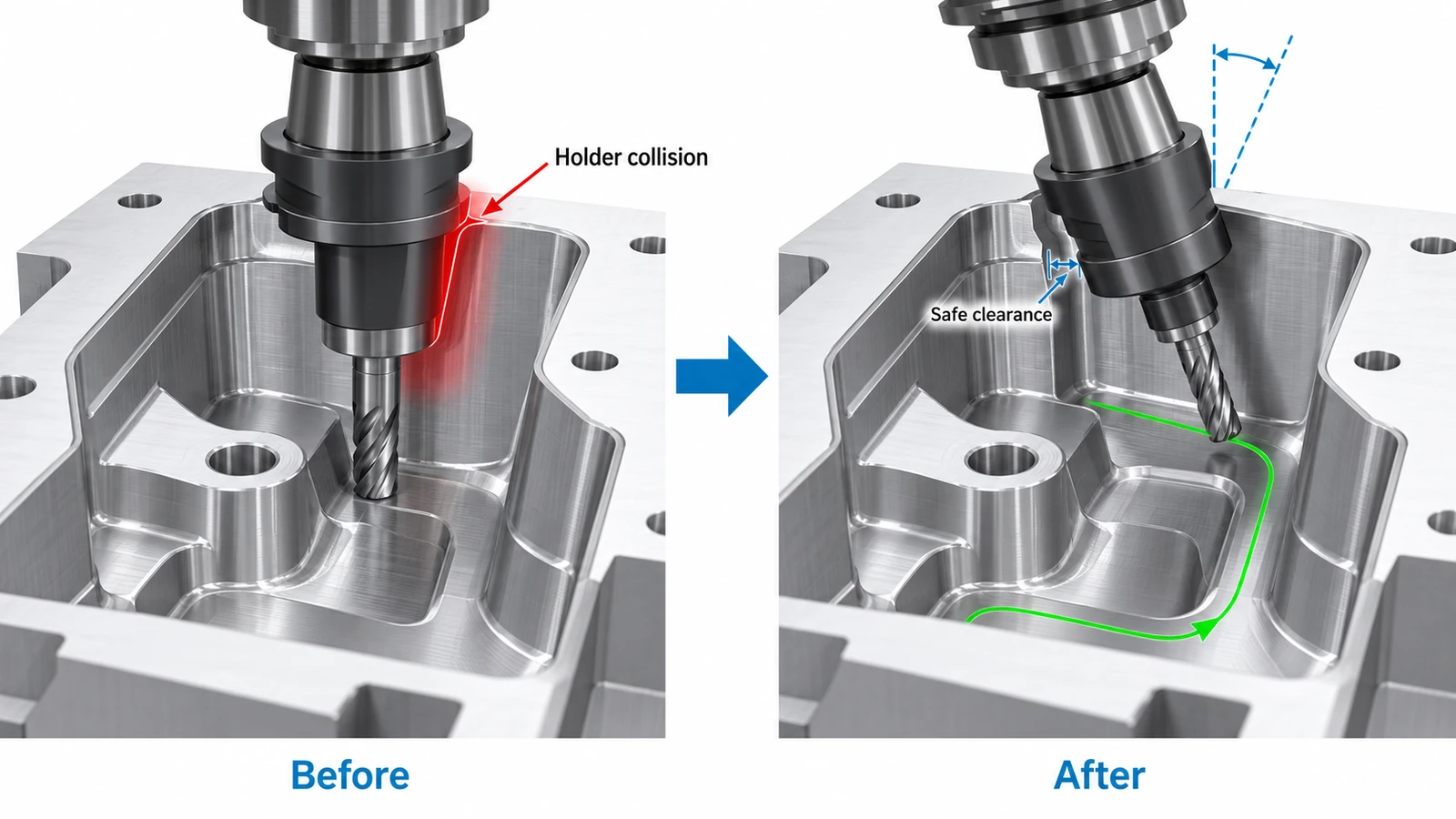
For example, tilting a cutting tool to reach a deep cavity may provide sufficient clearance at the cutting edge while bringing the tool holder dangerously close to the cavity wall.
Similarly, rotating a trunnion table may move the workpiece or fixture toward the spindle housing or other machine components.
The main challenges include:
- Changing tool and holder orientations throughout a toolpath.
- Limited clearance around deep pockets and angled features.
- Interference between fixtures and rotating machine components.
- Unexpected rotary-axis movement during repositioning.
- Collision risks during approach, retract, and linking moves.
A toolpath that appears safe when viewed only against the CAD model may still produce a collision on the actual CNC machine.
What Types of Collisions Can CAM Simulation Detect?
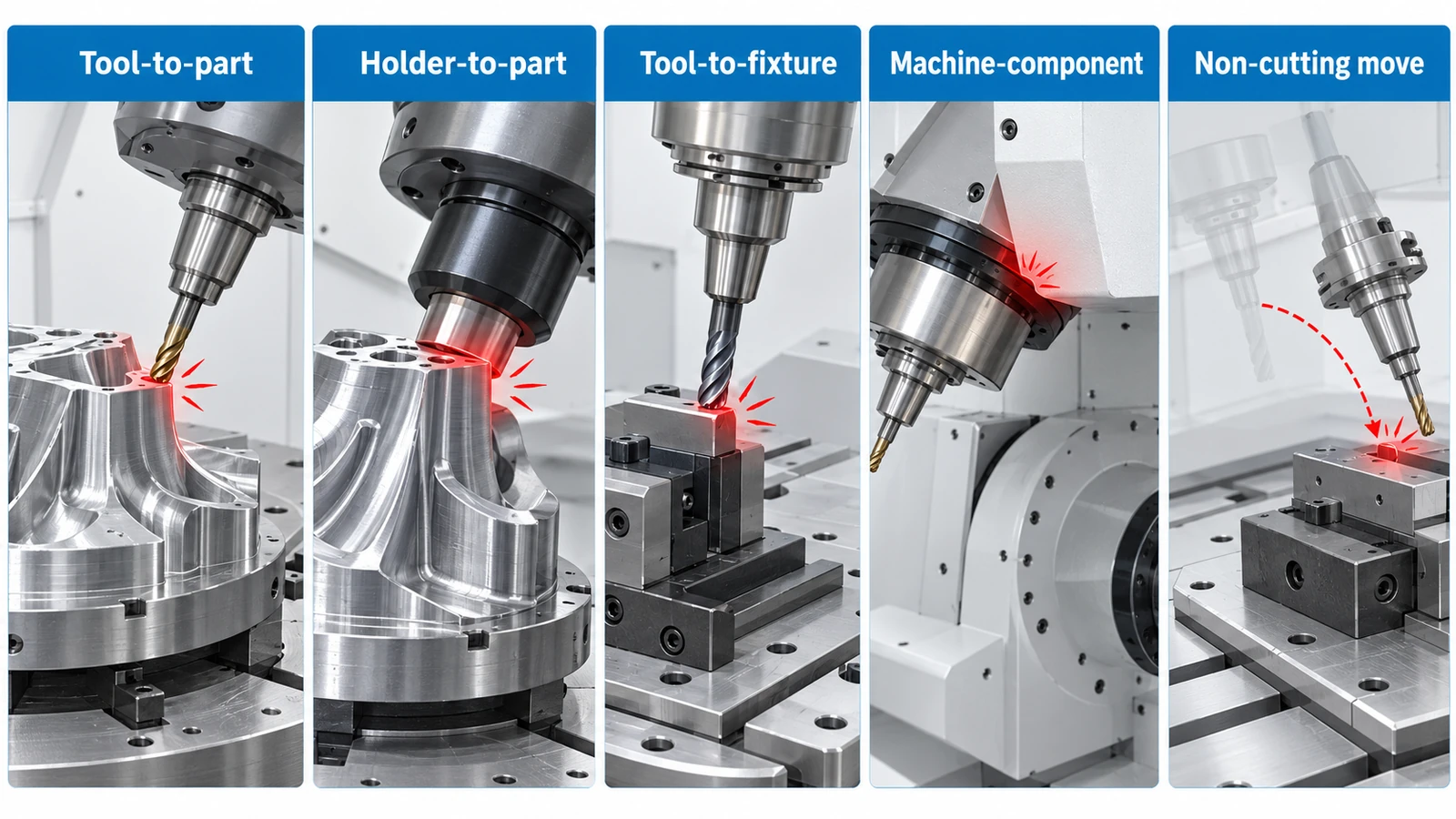
Depending on the software configuration and simulation model, CAM systems can identify several types of interference.
| Collision type | What happens | Typical cause |
|---|---|---|
| Tool-to-part collision | The cutter removes material outside the intended machining region. | Incorrect toolpath or tool orientation |
| Holder-to-part collision | The tool holder contacts the workpiece. | Insufficient clearance near deep walls |
| Tool-to-fixture collision | The cutter, shank, or holder contacts a clamp or fixture. | Incomplete toolpath clearance planning |
| Machine-component collision | Machine structures, tables, or spindle components interfere. | Rotary-axis movement or insufficient machine clearance |
| Non-cutting move collision | Interference occurs during approach, retract, or repositioning. | Unsafe linking movements |
These problems require different solutions.
A tool gouging the finished surface may indicate incorrect cutter contact or toolpath geometry. A holder colliding with a deep cavity wall, however, may require a different tool, a longer reach, or a modified tool-axis orientation.
Full machine simulation is particularly important when collision risks involve rotary tables, spindle housings, machine travel limits, or other components outside the immediate cutting area.
How Does 5-Axis CAM Simulation Prevent Collisions?
Collision prevention involves more than running a simulation once. Engineers must build an accurate digital machining environment, inspect potential interference, correct the toolpath, and verify the revised program.
1. Build an Accurate Digital Machining Setup
The simulation should represent the actual machining arrangement as closely as possible.
This includes the workpiece, stock, fixtures, cutting tools, tool holders, and relevant machine components.
For full machine simulation, the machine model must also reflect its axis configuration, travel limits, and rotary-axis kinematics.
An accurate digital setup allows programmers to identify problems that may not be visible when simulating the cutting tool alone.
For example, a fixture that is missing from the simulation may cause a toolpath to appear safe even though the actual holder would contact a clamp during machining.
2. Check Cutting Tool and Holder Clearance
The cutting edge is not the only component that requires clearance.
During 5-axis machining, the tool shank and holder may pass close to the workpiece, especially when machining deep cavities, steep walls, and angled surfaces.
CAM collision checks can help identify interference between the tool assembly and nearby geometry.
Programmers should examine:
- Clearance between the tool holder and cavity walls.
- Tool shank interference near steep surfaces.
- Fixture clearance during cutting and non-cutting moves.
- Available tool reach at different orientations.
Collision checking should use realistic tool assembly dimensions rather than an idealized cutting tool.
3. Adjust Tool Orientation and Toolpaths
When simulation identifies interference, engineers can modify the machining strategy before releasing the program.
One common solution is to change the tool tilt angle.
A small adjustment in orientation may allow the holder to clear a cavity wall while keeping the cutting edge engaged with the intended surface.
Other possible adjustments include changing the toolpath direction, modifying approach movements, selecting a smaller holder, or using a different cutter geometry.
However, every adjustment involves trade-offs.
Increasing tool stick-out may improve reach but reduce stiffness and increase the risk of vibration or tool deflection. Changing tool orientation may improve clearance but affect cutting conditions or surface finish.
The preferred solution should balance collision clearance, rigidity, surface quality, and machining time.
4. Verify Full Machine Movements
Toolpath verification and full machine simulation are not the same.
A toolpath can be collision-free relative to the workpiece while still requiring machine movements that create interference elsewhere.
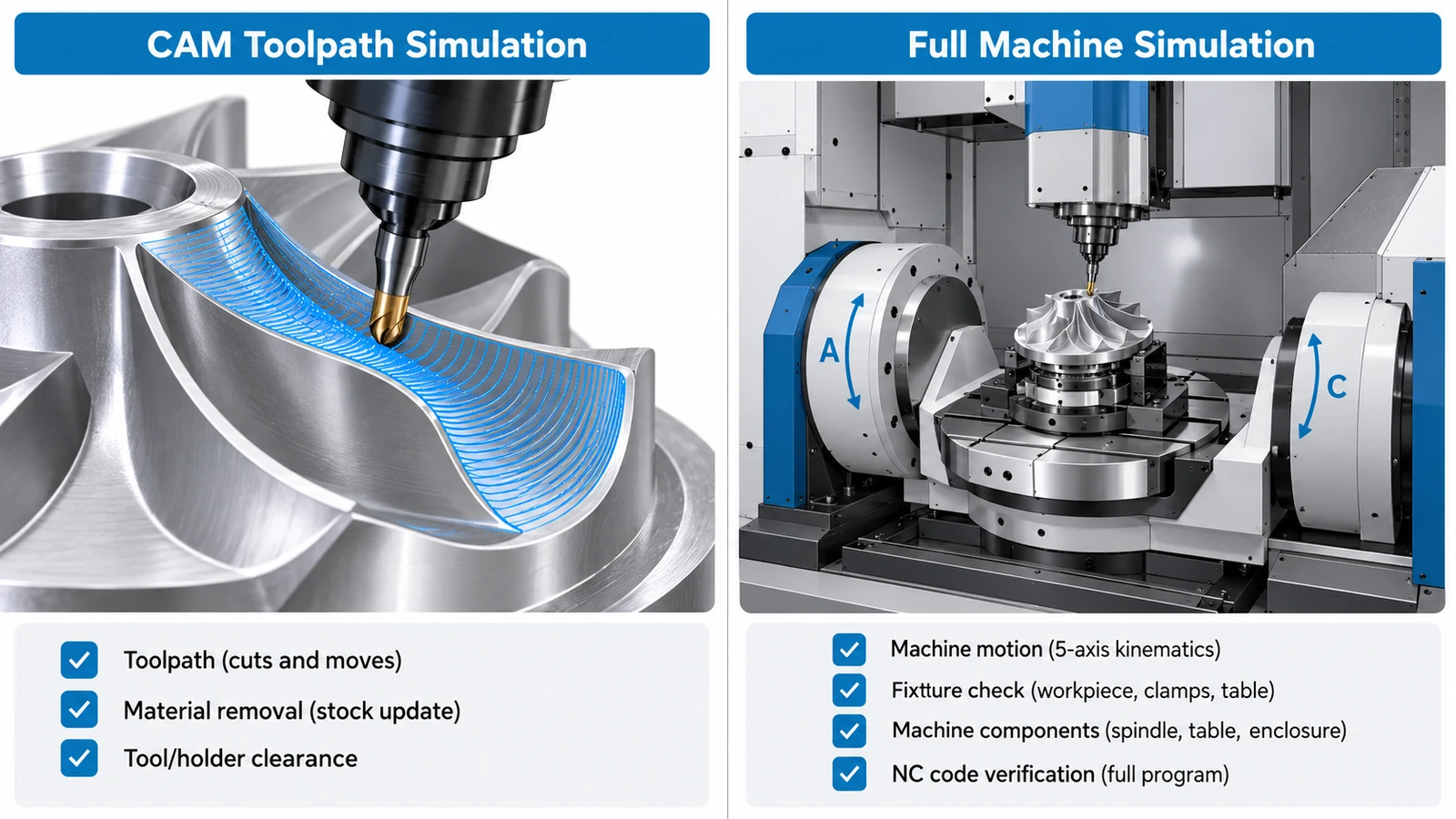
Full machine simulation uses the machine configuration and kinematic model to evaluate how machine components move during execution.
It can help identify potential interference involving the rotary table, spindle housing, fixtures, and other modeled components.
Where supported, verification of postprocessed NC code provides additional confidence that the simulated machine movements correspond to the program intended for the controller.
This matters because machine configuration, postprocessor settings, rotary-axis choices, and repositioning movements can affect how a programmed toolpath is executed.
5. Re-Simulate and Validate the Revised Program
After correcting a collision risk, the modified toolpath must be checked again.
Engineers should review both cutting and non-cutting movements, confirm fixture clearance, and inspect areas where the tool orientation changes rapidly.
If the program is regenerated or repostprocessed, the released NC code should be verified again as appropriate.
Simulation is also not a substitute for shop-floor safety procedures.
Before production, operators should confirm the physical setup, tool offsets, work coordinates, and actual fixture arrangement. Appropriate first-run checks, controlled prove-out procedures, and machine safety systems remain essential.
Common Collision Problems and How to Fix Them
CAM simulation becomes most useful when engineers can translate a detected collision into a practical machining adjustment.
The following examples illustrate common problems and possible corrective actions.
| Collision problem | Likely cause | Possible solution |
|---|---|---|
| Holder contacts a deep cavity wall | Insufficient radial clearance | Adjust tool tilt or select a slimmer holder |
| Tool gouges a finished surface | Incorrect tool orientation or toolpath geometry | Recalculate the toolpath and verify cutter contact |
| Cutter or holder contacts a clamp | Fixture blocks the programmed movement | Change the setup, tool access direction, or machining sequence |
| Rotary table approaches machine structure | Machine geometry or axis motion creates interference | Modify rotary-axis positioning or workholding |
| Collision occurs during retraction | Unsafe linking or retract movements | Revise clearance planes and non-cutting paths |
| Longer tool vibrates during cutting | Excessive tool overhang | Improve tool orientation or use a more rigid tool assembly |
Not every collision should be solved by increasing tool length.
For example, extending a tool to clear a deep cavity may introduce deflection and chatter, particularly during finishing operations.
In some situations, changing the tool-axis orientation allows a shorter, more rigid tool to reach the same surface.
CAM systems may also provide different responses to detected interference, including adjusting tool orientation, trimming unsafe toolpath segments, or stopping toolpath calculation. The appropriate response depends on the machining strategy and software capabilities.
CAM Toolpath Simulation vs. Full Machine Simulation
Toolpath simulation and full machine simulation serve different purposes. Both are valuable, but they verify different aspects of the machining process.
| Feature | CAM Toolpath Simulation | Full Machine Simulation |
|---|---|---|
| Cutting tool and workpiece interaction | Yes | Yes, depending on configuration |
| Tool holder clearance | Supported when modeled and enabled | Supported when modeled |
| Fixture collision detection | Depends on included geometry | Yes, when modeled |
| Rotary-axis movement | May show programmed tool orientation | Evaluates machine kinematics |
| Machine structural interference | Usually limited | Supported with an accurate machine model |
| NC code verification | May use CAM toolpath data | Available in systems with NC-code-based verification |
Toolpath simulation is useful for checking material removal, remaining stock, tool engagement, and tool assembly clearance.
Full machine simulation adds the machine structure and axis movements to the virtual environment.
For example, a cutting tool may maintain adequate clearance from an aluminum housing throughout a finishing toolpath. However, repositioning the rotary table could bring the fixture close to another machine component.
A toolpath-only simulation may not reveal this problem.
For complex five-axis work, NC-code-based machine simulation can offer another level of verification by checking the movements associated with the posted program. Systems such as hyperMILL VIRTUAL Machining support this approach using digital machine models.
The important distinction is that a collision-free CAM toolpath does not necessarily mean the complete machine program has been verified.
Practical Example: Avoiding Collisions in a Deep-Cavity Aluminum Part
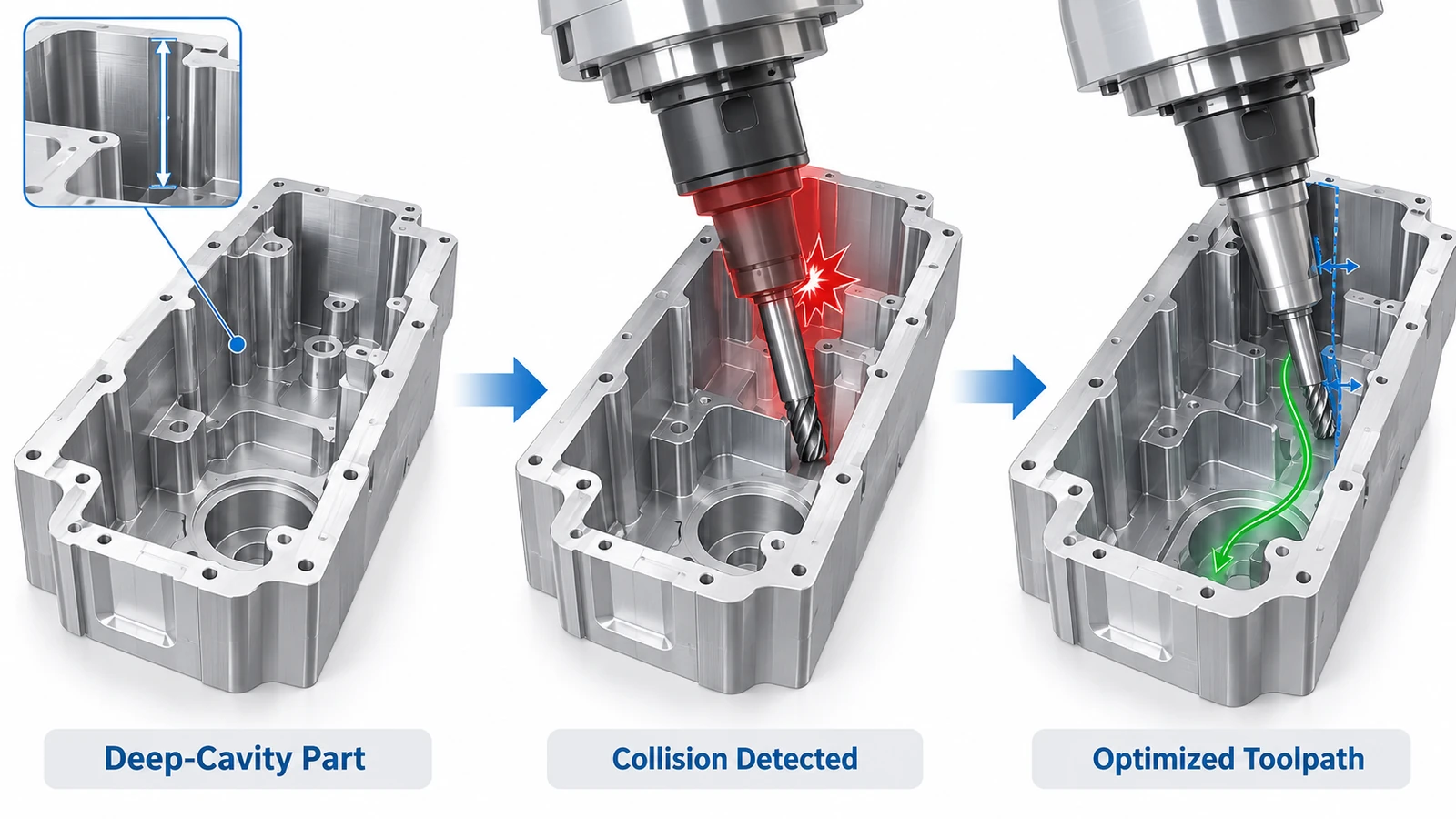
Consider a precision-machined aluminum housing containing deep pockets, internal radii, and undercut features.
These geometries create accessibility challenges because the cutter must reach surfaces located close to surrounding walls.
A conventional tool orientation may provide adequate cutting-edge access while leaving insufficient clearance for the tool holder.
The Machining Challenge
During toolpath preparation, the cutting tool must reach internal surfaces without allowing the holder or shank to contact the surrounding material.
One possible solution is to increase tool stick-out. However, a longer tool assembly may reduce stiffness and increase vibration during finishing.
The challenge is therefore not simply to reach the surface, but to maintain adequate clearance while preserving machining stability.
Evaluating Alternative Tool Orientations
Using CAM simulation, the programmer can examine holder clearance at different tool-axis orientations.
If a collision is detected, the toolpath can be modified to approach the feature from a different angle.
Depending on the geometry, a smaller holder, alternative cutter shape, or revised machining sequence may provide a better solution than extending the tool.
For selected features, 3+2 positional machining may provide sufficient access. Other complex surfaces may benefit from simultaneous five-axis movement.
The process selection should depend on the actual geometry rather than assuming that simultaneous motion is always necessary.
Verifying the Revised Strategy
After selecting the tool assembly and machining approach, the revised program should be checked for holder clearance, fixture interference, and unsafe positioning movements.
Full machine simulation can then evaluate whether the programmed rotary-axis movements fit within the available machine configuration.
The outcome is a machining strategy that has been evaluated for both tool access and potential interference before the physical machining process begins.
This approach reflects the engineering considerations involved in YUANYI’s 5 Axis CNC Machining Services, particularly when manufacturing complex aluminum housings and parts with restricted tool access.
What Can CAM Simulation Miss?
Even advanced CAM software depends on the accuracy of the information used to create the simulation.
A program can appear collision-free in the virtual environment while still presenting risks on the shop floor.
Common limitations include:
Incomplete fixture models. If a clamp, bolt, or other fixture component is missing from the digital setup, the simulation cannot reliably detect interference with that component.
Incorrect tool dimensions. Differences between the modeled tool assembly and the actual tool, holder, or stick-out length can invalidate clearance checks.
Work offset errors. Incorrect work coordinate settings can shift the physical machining position away from the simulated setup.
Differences between simulated and executed programs. Changes to NC code, postprocessor settings, or controller behavior may create movements that were not verified in the original simulation.
Dynamic machining effects. Tool deflection, vibration, thermal expansion, and cutting forces are not necessarily represented in geometric collision checks.
Therefore, collision simulation should be treated as one part of a broader process verification system.
Reliable machining still requires appropriate setup inspection, tool measurement, program verification, and controlled machine prove-out.