CNC programming typically involves creating a CAD model, generating toolpaths in CAM software, outputting G-code, and importing the program into a CNC machine for machining. Today, most CNC programs are automatically generated by CAD/CAM software rather than relying entirely on manual G-code writing.
Whether machining a simple bracket or a complex aerospace part, modern CNC programming generally follows the same process:
CAD Design
↓
CAM Programming
↓
Toolpath Generation
↓
G-Code Output
↓
Program Simulation
↓
Machine Setup
↓
Start Machining
Next, we will walk through the step-by-step process of how a CNC program is converted from a design drawing into an actual machining program.
What is CNC Programming?
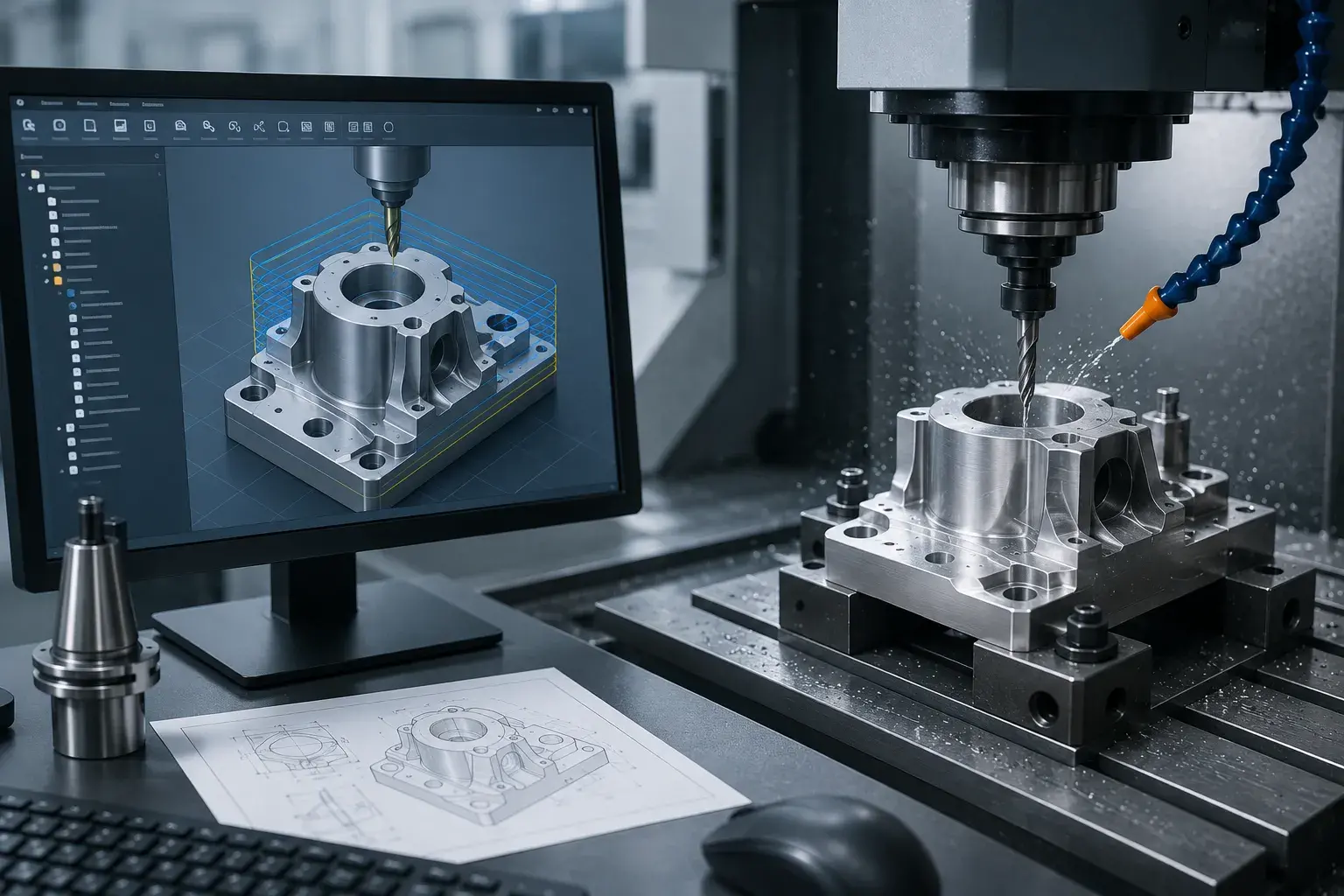
CNC programming refers to the creation of a set of digital instructions used to control a CNC machine tool to perform machining operations along a specified path.
These programs tell the machine tool:
- Where the cutting tool should move
- What cutting speed to use
- What feed rate to use
- When to change tools
- When to start or stop the spindle
Simply put, the program acts as the “brain” of the CNC machine tool, while the machine tool is responsible for executing various machining operations according to the program.
Step-by-Step CNC Programming Process
Step 1: Create a CAD Model
Every CNC program begins with part design.
Before starting to program, engineers must first create a part model using CAD software, such as:
- SolidWorks
- Fusion 360
- Creo
- AutoCAD
- Siemens NX
The CAD model defines the part’s dimensions, hole locations, slots, chamfers, and various geometric features.
If the CAD model contains errors, subsequent programming and machining will be affected; therefore, this is the first step in the entire CNC programming process.
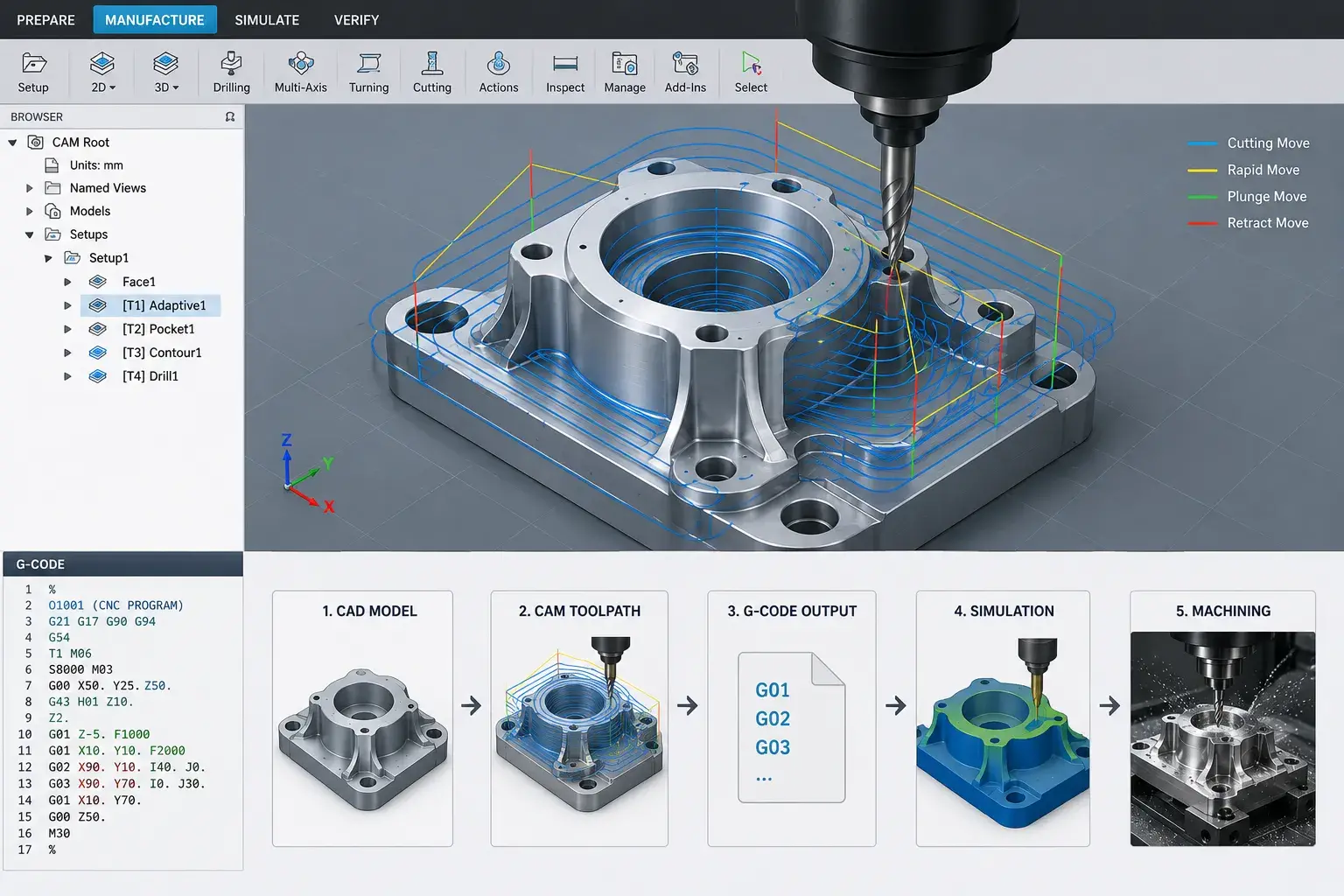
Step 2: Import the Model into CAM Software for Programming
Once the CAD design is complete, the model must be imported into CAM software.
CAM software is responsible for converting the part model into machining paths that the machine tool can execute.
Common CAM software includes:
- Fusion 360
- Mastercam
- SolidCAM
- hyperMILL
- PowerMill
In this step, the programmer must decide:
- Which cutting tools to use
- How to arrange the machining sequence
- Which areas to rough-machine first
- Which areas to finish-machine later
These decisions directly impact machining efficiency and part quality.
Step 3: Selecting Tools and Machining Strategies
Tool selection is a critical step in CNC programming.
Different machining features require different tools, such as:
- End Mill
- Ball Nose Cutter
- Drill
- Thread Mill
- Chamfer Tool
At the same time, you must determine the machining strategy.
Common machining strategies include:
- Roughing
- Semi-Finishing
- Finishing
- Drilling
- Threading
Appropriate tool and machining strategies not only improve machining efficiency but also extend tool life.
Step 4: Set Cutting Parameters
After selecting the tool, you need to set the machining parameters.
These primarily include:
- Spindle Speed (RPM)
- Feed Rate
- Depth of Cut
- Step Over
Different materials require different parameters.
For example:
- Aluminum alloys typically require higher spindle speeds
- Stainless steel typically requires lower spindle speeds
- Titanium alloys require more conservative cutting parameters
Appropriate cutting parameters can improve machining efficiency and achieve better surface quality.
Step 5: Generate G-Code
Once the toolpath and cutting parameters have been set, the CAM software automatically generates G-code.
G-code is the most common programming language for CNC machines, used to instruct the machine on how to move and perform machining operations.
A simple program example is as follows:
G90
G00 X0 Y0
G01 X50 Y50 F300
M30
This code represents:
- G90: Absolute coordinate mode
- G00: Rapid traverse
- G01: Linear cutting
- F300: Feed rate 300 mm/min
- M30: End of program
Although modern CAM software can automatically generate code, understanding basic G-code is still helpful for checking and optimizing programs.
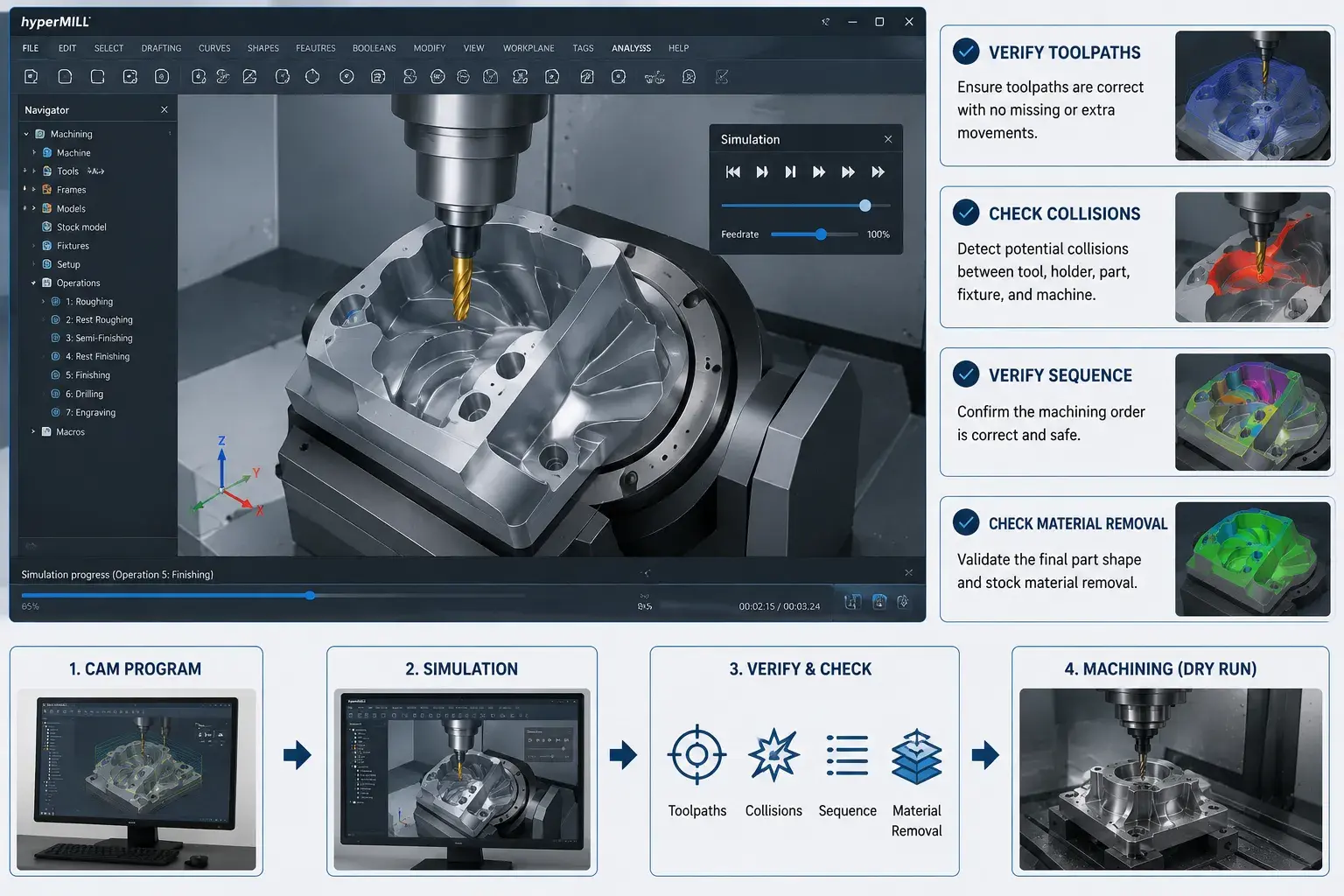
Step 6: Perform Program Simulation
Before actual machining begins, the program must be verified through simulation.
The primary purposes of program simulation are:
- To verify that the toolpaths are correct
- To identify potential collision risks
- To verify the machining sequence
- To check material removal
In actual production, program simulation can prevent many costly machining errors.
For example, when programming complex 5-axis parts, we typically perform a full simulation in hyperMILL first, followed by a dry run on the machine tool, to minimize the risk of tool collisions.
Step 7: Import the Program into the CNC Machine
Once you have confirmed that the program is error-free, you can import it into the machine.
Common methods include:
- USB transfer
- Network transfer
- DNC system transfer
After the program is imported, the operator will double-check the program version and machining settings to ensure they align with production requirements.
Step 8: Set Up the Machine and Begin Machining
Before starting actual machining, you must complete the machine setup.
This primarily includes:
- Installing the cutting tools
- Clamping the workpiece
- Setting the workpiece origin
- Checking tool length
- Dry Run (Test Run)
After the first part is machined, dimensional inspection is usually required.
Only if the dimensions meet the drawing specifications can you proceed to the actual production phase.
Manual CNC Programming vs. CAM Programming
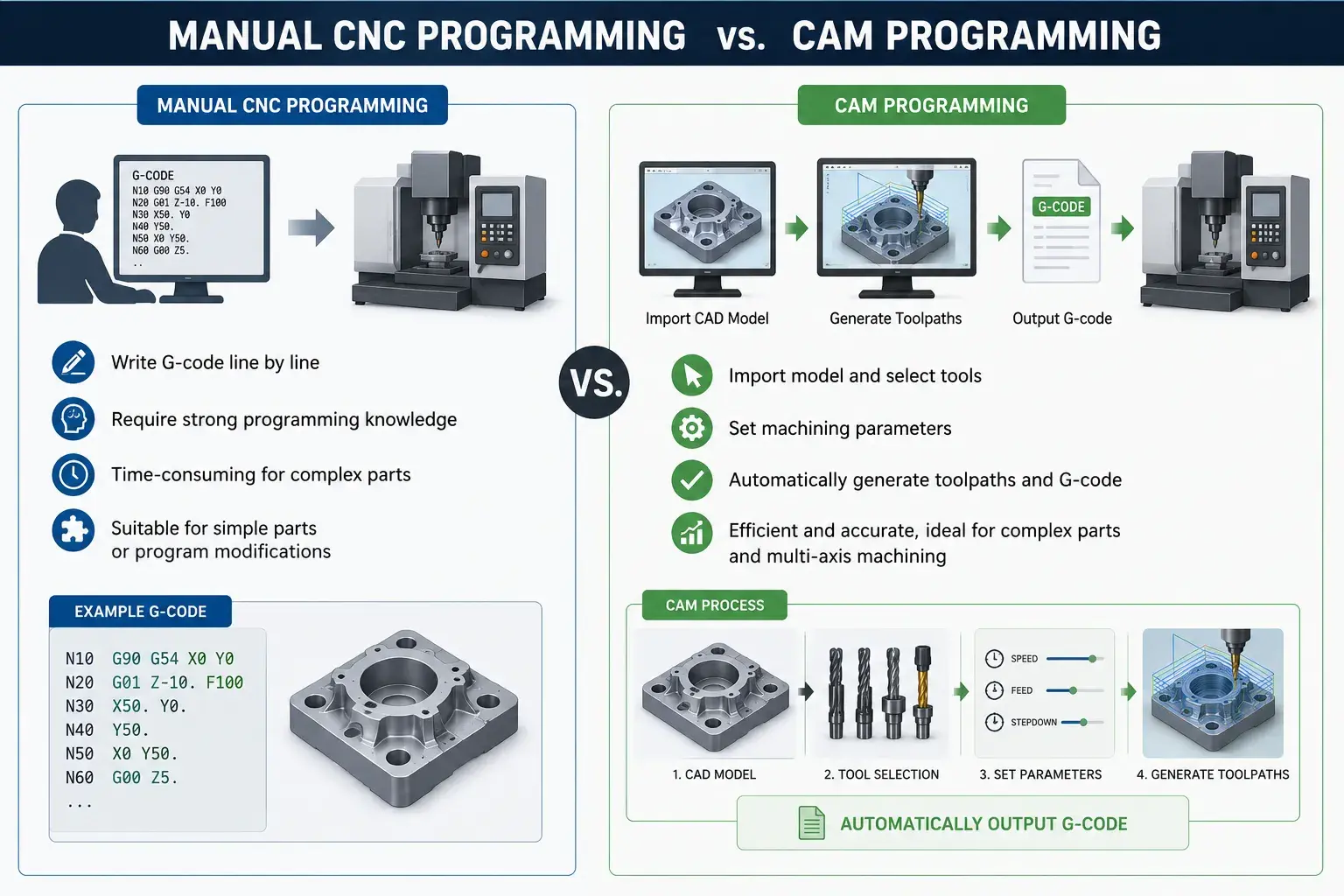
Currently, there are two main methods of CNC programming: manual programming and CAM programming.
Manual programming involves the programmer writing G-code directly to control the machine tool’s movements. This method is suitable for simple parts or modifying portions of a program, but it requires a significant amount of work for complex surfaces and multi-axis machining.
CAM programming, on the other hand, uses software to automatically generate toolpaths and G-code. The programmer simply needs to import the CAD model, select the cutting tool, and set the machining parameters, and the software handles the majority of the programming work.
Today, most CNC machining shops have adopted CAM programming, and CAM software is virtually indispensable, particularly for complex parts and 4-axis and 5-axis machining projects.
| Feature | Manual Programming | CAM Programming |
|---|---|---|
| Programming Speed | Slow | Fast |
| Complexity Handling | Limited | Excellent |
| Learning Difficulty | Higher | Easier |
| Error Risk | Higher | Lower |
| Best For | Simple Parts | Complex Parts |
Is CNC Programming Difficult to Learn?
For beginners, CNC programming isn’t as difficult as you might think.
If you just want to understand the basic process, you can grasp the fundamentals of CNC programming in a matter of days. However, it typically takes several weeks to a few months of study and practice to be able to program simple parts on your own.
In the past, programmers needed to be proficient in a vast array of G-code. Today, however, CAM software such as Fusion 360, Mastercam, and SolidCAM can automatically generate most programs, significantly lowering the learning curve.
What truly requires long-term experience is not software operation, but machining expertise—such as tool selection, optimization of cutting parameters, clamping solutions, and planning the machining sequence.
Need Help Manufacturing Your CNC Parts?
Send us your CAD files or drawings. Our engineering team will review your project, provide machining suggestions, and offer a fast quotation.
Get a Free CNC Machining QuoteBest CNC Programming Software for Beginners
Choosing the right software can make learning CNC programming much easier.
Fusion 360
Fusion 360 integrates CAD and CAM capabilities and is one of the most popular software choices among beginners. With its user-friendly interface and abundant learning resources, it is ideal for those just starting out.
Mastercam
Mastercam is one of the most widely used CAM software programs in the industrial sector, offering powerful toolpath strategies and a wide range of machining capabilities.
SolidCAM
SolidCAM integrates directly into SolidWorks, making it very convenient for engineers who already use SolidWorks for design.
hyperMILL
hyperMILL is primarily used for complex parts and high-end 5-axis machining, offering advanced toolpath optimization and simulation capabilities.
In our 5-axis CNC machining projects, engineers typically use hyperMILL for programming and toolpath verification to improve machining efficiency and reduce the risk of collisions.
Conclusion
Modern CNC programming has evolved from the manual writing of G-code in the past to a digital workflow centered around CAD/CAM software.
Whether for simple parts or complex multi-axis machining projects, a typical CNC programming workflow usually includes:
CAD Design
CAM Programming
Tool Selection
Cutting Parameters
Generate G-Code
Program Simulation
Load Program
Start Machining
With the advancement of CAM software, learning CNC programming has become easier than ever. Once you master the basic workflow, you will not only gain a better understanding of the CNC machining process but also be able to communicate project requirements more effectively with CNC machining providers.
Frequently Asked Questions
Most CNC machines are programmed using CAD and CAM software. Engineers create a digital model, generate toolpaths in CAM software, and then export the program as G-code that can be read by the CNC machine.
Not necessarily. Modern CAM software can automatically generate G-code from a CAD model. However, understanding basic G-code commands can help you troubleshoot programs and improve machining efficiency.
Fusion 360 is often considered one of the easiest CNC programming software options for beginners because it combines CAD and CAM functions in a single platform and offers many learning resources.
The basics of CNC programming are relatively easy to learn. Most beginners can understand the workflow within a few days. However, mastering tool selection, machining strategies, and cutting parameters requires practical experience.
CAD (Computer-Aided Design) is used to create a digital model of a part, while CAM (Computer-Aided Manufacturing) is used to generate toolpaths and CNC programs based on that model.
For basic programming, most people can learn the fundamentals within a few weeks. Becoming a skilled CNC programmer typically takes months or years of hands-on machining experience.
CNC programming focuses on creating machining instructions and toolpaths, while CNC operation involves setting up the machine, loading tools, running programs, and inspecting finished parts.